




Exporting Your Data To A CSV File
1. Open your application and open your form in Search Update mode. Retrieve the records you want to export.
2. If the Spec Window title bar at the bottom left of your screen does not display Export followed by the name of your form, click on the large arrow to the right of the title until Export is the displayed spec.
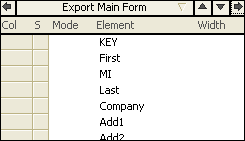
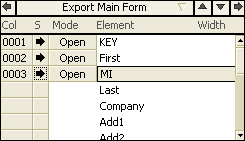
3. In the Spec Window, click the grey box next to the fields that you want to export. An arrow appears in the box to inform you that the field is selected for export. The number displayed next to the arrow indicates the order of the elements you have selected.
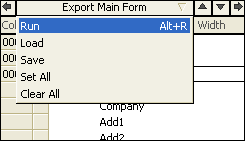
4. In the Spec Window, click on the title bar which should say Export followed by your form name. Select Run from the list of options that appears.
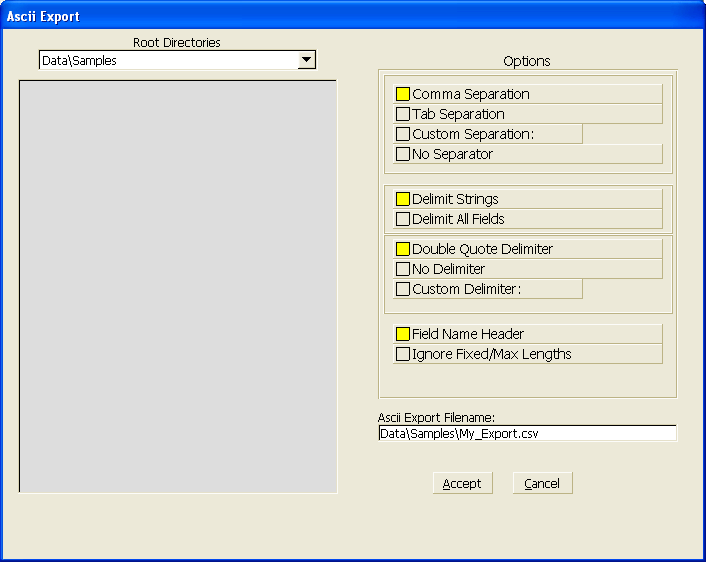
5. The Ascii Export window appears on your screen asking you to enter a filename for the export. Be sure to include the file extension(.csv or .txt) in the filename. The default options will work under most circumstances. Enter the filename you want to use in the Ascii Export Filename box and click Accept.
6. Sesame exports your data to the specified file.
More Information:
Information about Exporting data from Sesame is located on page 343 of the 2.0 Sesame User Guide.